
Live production moves quickly. Your graphics platform should help your team keep pace without adding unnecessary steps, complexity, or uncertainty.
Captivate 2026.2 continues NewBlue’s investment in making live graphics production more approachable, reliable, and responsive to the way operators actually work. The release introduces a more flexible workspace, expands access to live data, and brings helpful AI guidance directly into Captivate.
Together, these advancements support three priorities: putting operators first, expanding what live data can do, and giving every user the tools to produce at their best.
A platform built around the operator
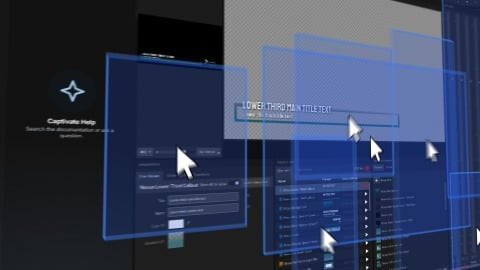
Every production is different. Some operators need fast access to graphics and controls during a live sporting event. Others manage multiple inputs, audio sources, data feeds, and outputs across a larger broadcast workflow.
The new Layout Manager in Captivate 2026.2 gives operators greater control over how their workspace is arranged. Panels can be repositioned and docked to create a layout that better supports each production, operator, and screen setup. Once arranged, the workspace can be saved and recalled for future use.
A restyled mixer and channel strips also make essential audio controls clearer and easier to navigate. Additional live audio improvements provide greater reliability when it matters most.
The result is a workspace that adapts to the operator, helping teams spend less time navigating the software and more time focused on the production.
An expanding live data ecosystem

Captivate has always helped producers turn live data into compelling on-air graphics. Captivate 2026.2 expands that capability with a new direct integration for FinishLynx timing and results data.
The FinishLynx Data Controller connects live race information directly to Captivate, allowing timing and results data to drive graphics and leaderboards with less manual entry. As results change, productions can present current information to viewers quickly and accurately.
This connection is an important step in Captivate’s growing data ecosystem. By bringing data closer to the graphics workflow, operators can reduce repetitive tasks, respond faster, and give audiences a clearer view of what is happening in real time.
Continued enhancements to crawls and leaderboards further strengthen the data-driven tools operators use to share results, updates, standings, messages, and other important information throughout a production.
Helping every user work like a pro

Powerful production tools should not be limited to experienced operators.
Captivate 2026.2 introduces the built-in AI Help Panel, providing guidance directly inside the application. Instead of leaving Captivate to search for answers, users can get assistance where they are already working.
This is especially valuable for new operators, students, volunteers, and smaller production teams that may not have a dedicated graphics expert available at every event. The AI Help Panel can help lower the learning curve, answer questions, and support users as they become more familiar with Captivate.
For experienced operators, in-app help provides another way to find information quickly and keep the production moving.
The AI Help Panel marks the beginning of a broader AI roadmap for Captivate, focused on making sophisticated production tools more accessible and useful to every operator.
Built to keep production moving
Captivate 2026.2 brings together a more flexible workspace, stronger live data connections, and help available directly inside the application.
These improvements are designed around a simple goal: remove friction behind the scenes so operators can create better experiences on air.
Whether you are producing school sports, live events, news, government programming, or professional broadcasts, Captivate gives your team the tools to work more efficiently, present information clearly, and give every moment on air the impact it deserves.
**Ready to make every broadcast an extraordinary experience?**
Explore what’s new in Captivate 2026.2 or try Captivate free today.
Existing perpetual-license customers should make sure their Captivate Maintenance plan is up to date to access the new features in Captivate 2026.2. Your first year is included for free with your purchase of any Captivate Broadcast or Sport edition.